
Feature-Based Development and Good Prompting
Last updated on 2026-09-16 | Edit this page
Overview
Questions
- Why work feature by feature instead of requesting whole projects?
- What happens when I give an agent a vague request?
- What does a good prompt look like for research code?
- Which routine tasks are agents reliably good at?
Objectives
- Decompose a plan into feature-sized, verifiable tasks and work on them one per session.
- Predict how an agent fills gaps in an underspecified request.
- Distinguish context engineering (standing guidance) from prompt engineering (the specific request).
- Write prompts that specify inputs, output, the check for completion, and what not to modify.
- Implement one feature from your plan and audit the decisions the agent made on your behalf.
The agent is not a magic wand
Some frustration with agents comes from using them as one: describe the whole project, wait, and receive something plausible and wrong. This style of use is sometimes called vibe coding. The remedy is a person in the loop who knows the domain. You decide what to build next; the agent builds that one thing; you check it before the next. Your expertise is what makes the arrangement work, not the prompt and not the model.
Work feature by feature, not project by project
A feature is one thing you can check: load and validate the data
slice; train one baseline; write the scoring function. The
plan.md from the previous episode is the feature list. Work
through it in order.
- One feature per session. Fresh context, a small diff, one pull request. The cost episode explains why a fresh session matters: everything in a long session competes for the model’s attention.
- Specify each feature: inputs, output, how you will know it works, what not to modify.
- Small scope produces small diffs, which you can review in full. A project-sized prompt produces worse code and a diff too large to review, at which point you have given up control without deciding to.
A whole-project prompt produces whole-project guesses.
A bad prompt does not return random results
When a request is ambiguous, the agent does not fail and does not choose at random. It fills each gap in the specification with the most statistically typical choice from its training data: the most common file layout, the default hyperparameters, the standard preprocessing for data that resembles yours.
This is why underspecified requests usually produce code that runs and looks reasonable. Average-case answers generally do. Research data and code are rarely the average case. The instrument artifact specific to your equipment is not in the training data. Your field may follow a convention the average repository does not. Your “duplicate rows” may be repeated measures. Each unstated assumption is resolved in favor of someone else’s typical project, without any indication that a choice was made.
Two consequences follow:
- The specification work you would do for a human collaborator does not disappear. It moves into the prompt.
- The failure mode is plausible-but-wrong rather than visibly broken. This is why the next episode, on verification, is the core of the lesson.
Guide the agent with clear instructions
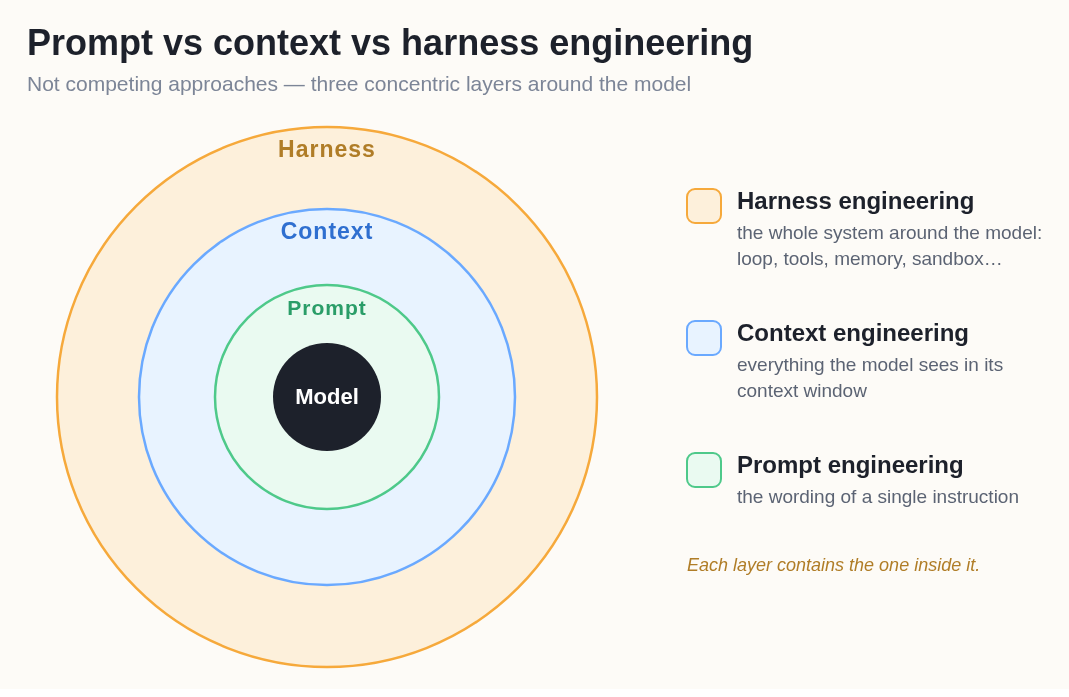
There are two levers, operating at different time scales:
-
Context engineering sets the standing guidelines
for generating code and the resources the agent may use: the project
context file (
CLAUDE.md,AGENTS.md,copilot-instructions.md), coding-standards files,plan.md. Written once, read in every session. A shared context file is an inexpensive way to keep a team’s code consistent. - Prompt engineering phrases the specific request to obtain the best result for the task at hand.
These are not alternatives. They are concentric layers around the model, and each contains the one inside it. The harness (the loop, tools, memory, sandbox) is the outermost layer and is mostly fixed by the tool; the context and the prompt are yours to set.
The same request at two levels of specification:
Weak prompt:
Fix this bug.
Better prompt:
Here is the error, the code that raised it, and what was running as input.
Error log <paste full traceback>
Code <paste the function or file>
Input <what data or arguments it was called with>
Before changing anything, explain what you think is causing this and how you would confirm it. Wait for me to agree before you apply a fix.
The better prompt supplies the evidence (traceback, code, input), asks for a diagnosis before any change, and keeps the decision with you. “Fix this bug” alone leaves the meaning of “fixed” to the average case, and an agent told to make an error disappear sometimes does so by removing the check that raised it.
A checklist for research-code prompts:
- Where: which files or functions to modify, and which to leave alone.
- What: the behavior you want, including the edge cases you know about.
- Constraints: conventions, permitted dependencies, things to preserve.
- Verification: how the agent should check its own work. Run the tests; confirm the row count is unchanged; print the class balance before and after.
The last item leads into the next episode. A prompt that includes its own check is worth more than one that does not.
Exercise: Implement feature 1 from your plan (15 minutes)
Take feature 1 from your plan.md, or any feature you
want to add.
-
Write the prompt using the template below. Direct the agent to
plan.mdand your project’s goal page.Implement feature 1 from
plan.md.Feature <name and what it does>
Inputs (if applicable) <files or data it reads; the slice we agreed on>
Output (if applicable) <what it produces and where>
Done when <the check that proves it works: a test, or a printed baseline number>
Do not touch <other files,
data/raw/, the scoring function>Work on a new branch (most coding agents do this automatically). When finished, list every choice you made that I did not specify.
Run it. Read the diff before anything else.
Audit. Did it do only what you asked? What did it decide that you did not specify?
If you have no project, use this starter and request one feature: a stratified 80/20 split, a standardized logistic regression, and a printed majority-class baseline alongside the test accuracy.
The request to list unspecified choices is the most informative line in the template. Typical answers: a random seed, a default imputation, an added metric, a file you did not ask for, an installed dependency. Each is now a decision you are responsible for. The ones that surprise you belong in the next prompt, or in the context file so they need not be specified again.
A bare “implement the model” prompt, by contrast, produces something that looks complete, with choices you did not make and no list of them.
:## Give your agent maintenance tasks
If you are new to agentic workflows, as most people are, consider starting with maintenance tasks, which agents do particularly well. They are the routine work that keeps a research repository usable, and each should be treated as a feature: small, specified, checkable, one pull request, reviewed by you.
- Refactoring. Split the 400-line notebook into functions and a script. Tests pass before and after, or the refactor is not complete.
- Docstrings and type hints on every function. Ask for a diff that changes no logic, then confirm that it did not.
- A README that matches the code. “Read the repo and list what the README says that is no longer true.”
-
Environment files. Pin
requirements.txtorenvironment.ymlfrom what the code imports. -
Weekly merge preparation. “Summarize what changed
on this branch since
main, for the teammates who were not here.”
Documentation: notes to your future self and your agent
Documentation deserves more than a place on that list, for three reasons.
- It is now cheap. Research code is under-documented because writing docstrings and READMEs lost to the next experiment. The agent has the source of truth in context, and a paragraph of prose is faster to review than an implementation. Ask for docstrings, comments that explain why (not what), a README that says how to run the pipeline end to end, narrated notebooks, and a short end-of-session note on what changed and where to resume.
-
It becomes context. Everything you document is read
by the agent in later sessions. Agents recover what and
how from code but not why, for whom, or what
the data means. A data dictionary is the difference between an agent
that treats
-999as a measurement and one that knows it is the missing-value code. - Explaining is a check. To write an accurate docstring the model has to process what the code does, and a mismatch between its explanation and your intent points to a bug or an undocumented decision. Asking “explain in two sentences what this function does and why it exists” is an inexpensive review step.
Generated documentation has the same failure mode as generated code: it reads as confident and can be wrong. Read it before committing, update it with the code, and periodically ask the agent to verify every claim in the README, docstrings, and comments against what the code does, and list every mismatch.
- The agent is not a magic wand. A person who knows the domain decides what to build next; the agent builds that one thing.
- A feature is one thing you can check. Work through the plan one feature per session, with a small diff and one pull request.
- Underspecified prompts receive average-case answers, and research data is rarely the average case. The failure mode is plausible-but-wrong.
- Context engineering sets the standing rules (context file, standards, plan); prompt engineering phrases the specific request. Use both.
- Good prompts provide evidence, ask for a diagnosis before a change, and specify inputs, output, the completion check, and what not to modify.
- Maintenance tasks (refactors, docstrings, README audits, environment pins, merge summaries) are well suited to agents under the same small-specified-checkable rules.
- Always ask the agent to list the choices you did not specify.