
Overview of Google Cloud for Machine Learning and AI
Last updated on 2026-03-04 | Edit this page
Estimated time: 12 minutes
Overview
Questions
- Why would I run ML/AI experiments in the cloud instead of on my laptop or an HPC cluster?
- What does GCP offer for ML/AI, and how is it organized?
- What is the “notebook as controller” pattern?
Objectives
- Identify when cloud compute makes sense for ML/AI work.
- Describe what GCP and Vertex AI provide for ML/AI researchers.
- Explain the notebook-as-controller pattern used throughout this workshop.
Why run ML/AI in the cloud?
You have ML/AI code that works on your laptop. But at some point you need more — a bigger GPU (or multiple GPUs), a dataset that won’t fit on disk, or the ability to run dozens of training experiments overnight. You could invest in local hardware or compete for time on a shared HPC cluster, but cloud platforms let you rent exactly the hardware you need, for exactly as long as you need it, and then shut it down.
Cloud vs. university HPC clusters
Most universities offer shared HPC clusters with GPUs. These are excellent resources — but they have tradeoffs worth understanding:
| Factor | University HPC | Cloud (GCP) |
|---|---|---|
| Cost | Free or subsidized | Pay per hour |
| GPU availability | Shared queue; wait times during peak periods and per-job runtime limits (often 24–72 hrs) that may require checkpointing long training runs | On-demand (subject to quota); jobs run as long as needed |
| Hardware variety | Fixed hardware refresh cycle (3–5 years) | Latest GPUs available immediately (A100, H100, L4) |
| Scaling | Limited by cluster size | Spin up hundreds of jobs in parallel |
| Multi-GPU / NVLink | Sometimes available, depends on cluster | Available on demand (e.g., A2/A3 instances with NVLink-connected multi-GPU nodes) — essential for training, fine-tuning, or serving large LLMs that don’t fit in a single GPU’s memory |
| Job orchestration | Writing scheduler scripts, packaging environments, and wiring up parallel job arrays can take days of refactoring | A few SDK calls: define a job, set hardware, call
.run() — parallelism (e.g., tuning trials) is built in |
| Software environment | Module system; some clusters support Apptainer/Singularity containers — research computing staff can often help with setup | Vertex AI provides prebuilt
containers for common ML frameworks (PyTorch, XGBoost, TensorFlow);
add extra packages via a requirements list, or bring your
own Docker image for full control |
| Power & cooling | Paid for by the university; campus data centers often spend nearly as much energy on cooling as on the computers themselves | Google’s data centers are roughly twice as energy-efficient as a typical campus facility — and power, cooling, and hardware failures are their problem, not yours |
The short version: use your university cluster when it has the hardware you need and the queue isn’t blocking you. Use the cloud when you need hardware your cluster doesn’t have, need to scale beyond what the queue allows, or need a specific software environment you can’t easily get on-campus.
Many researchers use both — develop and test on HPC, then scale to cloud for large experiments or specialized hardware. This workshop teaches the cloud side of that workflow.
When does model size justify cloud compute?
Not every model needs cloud hardware. Here’s a rough guide:
| Model scale | Parameters | Example models | Where to run |
|---|---|---|---|
| Small | < 10M | Logistic regression, small CNNs, XGBoost | Laptop or HPC — cloud adds overhead without much benefit |
| Medium | 10M–500M | ResNets, BERT-base, mid-sized transformers | HPC with a single GPU (RTX 2080 Ti, L40) or cloud (T4, L4) |
| Large | 500M–10B | GPT-2, LLaMA-7B, fine-tuning large transformers | HPC with A100 (40/80 GB) or cloud — both work well |
| Very large | 10B–70B | LLaMA-70B, Mixtral | HPC with H100/H200 (80–141 GB) or cloud multi-GPU nodes |
| Frontier | 70B+ | GPT-4-scale, multi-expert models | Cloud — requires multi-node clusters beyond what most HPC queues offer |
CHTC’s GPU Lab covers more than you might think. The GPU Lab includes A100s (40 and 80 GB), H100s (80 GB), and H200s (141 GB) — enough VRAM to run inference or fine-tune models up to ~70B parameters on a single GPU with quantization. For many UW researchers, this hardware handles “large model” workloads without needing cloud. Jobs have time limits (12 hrs for short, 24 hrs for medium, 7 days for long jobs), so plan your training runs accordingly.
Cloud becomes the clear choice when you need interconnected multi-GPU nodes (NVLink) for large distributed training, hardware beyond what the GPU Lab queue offers, or when queue wait times are blocking a deadline.
A note on cloud costs
Cloud computing is not free, but it’s worth putting costs in context:
-
Hardware is expensive and ages fast. A single A100
GPU costs ~
$15,000and is outdated within a few years. Cloud lets you rent the latest hardware by the hour. - You pay only for what you use. Stop a VM and the meter stops — valuable for bursty research workloads.
- Managed services save development time. You don’t have to build DAGs, write scheduling logic, package custom containers, or maintain orchestration infrastructure — GCP handles that plumbing so you can focus on the ML.
- Budgets and alerts keep you safe. GCP billing dashboards and budget alerts help prevent surprise bills. We cover cleanup in Episode 9.
The key habit: choose the right machine size, stop resources when idle, and monitor spending. We’ll reinforce this throughout.
For UW-Madison researchers
UW-Madison offers reduced-overhead cloud billing, NIH STRIDES
discounts, Google Cloud research credits (up to $5,000),
free on-campus GPUs via CHTC,
and dedicated support from the Public Cloud Team. See the
UW-Madison Cloud Resources
page for details.
Google Cloud Platform (GCP) is one of several clouds that supports this. The rest of this episode explains what GCP offers for ML/AI and how the pieces fit together.
What GCP provides for ML/AI
GCP gives you three things that matter for applied ML/AI research:
Flexible compute. You pick the hardware that fits your workload:
- CPUs for lightweight models, preprocessing, or feature engineering.
- GPUs (NVIDIA T4, L4, V100, A100, H100) for training deep learning models. For help choosing, see Compute for ML.
- TPUs (Tensor Processing Units) — Google’s custom hardware for matrix-heavy workloads. TPUs work best with TensorFlow and JAX; PyTorch support is improving but still less mature.
Scalable storage. Google Cloud Storage (GCS) buckets give you a place to store datasets, scripts, and model artifacts that any job or notebook can access. Think of it as a shared filesystem for your project.
Managed ML/AI services. Vertex AI is Google’s ML/AI platform. It wraps compute, storage, and tooling into a set of services designed for ML/AI workflows — managed notebooks, training jobs, hyperparameter tuning, model hosting, and access to foundation models like Gemini.
How the pieces fit together: Vertex AI
Google Cloud has many products and brand names. Here are the ones you’ll use in this workshop and how they relate:
| Term | What it is |
|---|---|
| GCP | Google Cloud Platform — the overall cloud: compute, storage, networking. |
| Vertex AI | Google’s ML platform — notebooks, training jobs, tuning, model hosting. Everything below lives under this umbrella. |
| Workbench | Managed Jupyter notebooks that run on a Compute Engine VM. Your interactive environment. |
| Training & tuning jobs | How you run code on Vertex AI hardware. You submit a script and a
machine spec; Vertex AI provisions the VM, runs it, and shuts it down.
The SDK offers several flavors — CustomTrainingJob (Ep
4–5), HyperparameterTuningJob (Ep 6) — and the CLI
equivalent is gcloud ai custom-jobs (Ep 8). |
| Cloud Storage (GCS) | Object storage for files. Similar to AWS S3. |
| Compute Engine | Virtual machines you configure with CPUs, GPUs, or TPUs. Workbench and training jobs run on Compute Engine under the hood. |
| Gemini | Google’s family of large language models, accessed through the Vertex AI API. |
For a full list of terms, see the Glossary.
The notebook-as-controller pattern
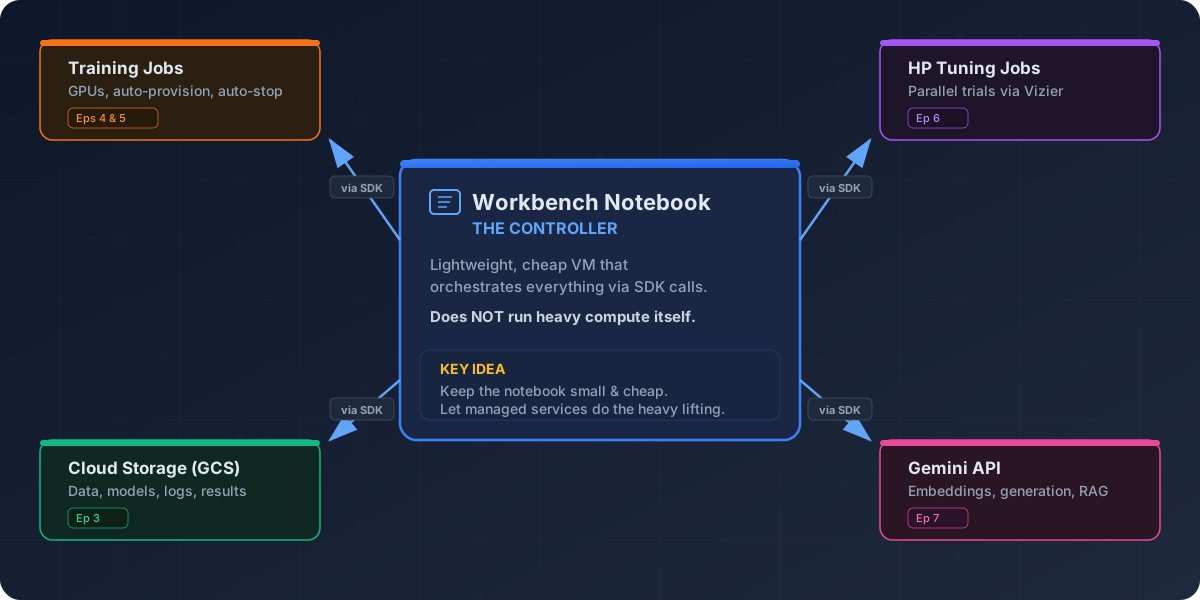
The central idea of this workshop is simple: you work in a lightweight Vertex AI Workbench notebook — a small, cheap VM — and use the Vertex AI Python SDK to dispatch work to managed services. The notebook itself does not run heavy compute. Instead, it orchestrates:
- Training jobs (Eps 4–5) — run your script on auto-provisioned GPU hardware, then shut down when complete.
- Hyperparameter tuning jobs (Ep 6) — search a parameter space across parallel trials and return the best configuration.
- Cloud Storage (Ep 3) — shared persistent storage for datasets, model artifacts, logs, and results.
- Gemini API (Ep 7) — embeddings and generation for Retrieval-Augmented Generation (RAG) pipelines.
All of these are accessed via SDK calls from the notebook. This keeps costs low (the notebook VM stays small) and keeps your work reproducible (each job is a clean, logged run on dedicated hardware).
Console, notebooks, or CLI — your choice
This workshop uses the GCP web console and
Workbench notebooks for most tasks because they’re
visual and easy to follow for beginners. But nearly everything we do can
also be done from the gcloud command-line
tool — submitting training jobs, managing buckets, checking
quotas. Episode 8 covers the CLI
equivalents. If you prefer terminal-based workflows or need to automate
jobs in scripts and CI/CD pipelines, that episode shows you how.
One important caveat: whether you use the console, notebooks, or CLI, resources you create (VMs, training jobs, endpoints) keep running and billing until you explicitly stop them. There’s no automatic shutdown. We cover cleanup habits in Episode 9, but the short version is: always check for running resources before you walk away.
Your current setup
Think about how you currently run ML experiments:
- What hardware do you use — laptop, HPC cluster, cloud?
- What’s the biggest infrastructure pain point in your workflow (GPU access, environment setup, data transfer, cost)?
- What would you most like to offload to a managed service?
Take 3–5 minutes to discuss with a partner or share in the workshop chat.
- Cloud platforms let you rent hardware on demand instead of buying or waiting for shared resources.
- GCP organizes its ML/AI services under Vertex AI — notebooks, training jobs, tuning, and model hosting.
- The notebook-as-controller pattern keeps your notebook cheap while offloading heavy training to dedicated Vertex AI jobs.
- Everything in this workshop can also be done from the
gcloudCLI (Episode 8).