
Retrieval-Augmented Generation (RAG) with Vertex AI
Last updated on 2026-03-05 | Edit this page
Estimated time: 30 minutes
Overview
Questions
- How do we go from “a pile of PDFs” to “ask a question and get a cited answer” using Google Cloud tools?
- What are the key parts of a RAG system (chunking, embedding, retrieval, generation), and how do they map onto Vertex AI services?
- How much does each part of this pipeline cost (VM time, embeddings, LLM calls), and where can we keep it cheap?
Objectives
- Unpack the core RAG pipeline: ingest → chunk → embed → retrieve → answer.
- Run a minimal, fully programmatic RAG loop on a Vertex AI Workbench VM using Google’s foundation models for embeddings and generation.
- Answer questions using content from provided papers and return grounded answers backed by source text, not unverifiable claims.
Background concepts
This episode shifts from classical ML training (Episodes 4–6) to working with large language models (LLMs). If any of the following terms are new to you, here’s a quick primer:
- Embeddings: A numerical vector (list of numbers) that represents the meaning of a piece of text. Texts with similar meanings have similar vectors. This lets us search “by meaning” rather than by keyword matching.
- Cosine similarity: A measure of how similar two vectors are (1.0 = identical direction, 0.0 = unrelated). Used to find which stored text chunks are most relevant to a question.
- Large Language Model (LLM): A model (like Gemini, GPT, or LLaMA) trained on massive text corpora that can generate coherent text given a prompt. In this episode, we use an LLM to answer questions based on retrieved text, not to train one from scratch.
-
Foundation model APIs: In this episode, we use the
google-genaiclient library to access Google’s managed embedding and generation models. This is separate from thegoogle-cloud-aiplatformSDK used for training jobs in earlier episodes.
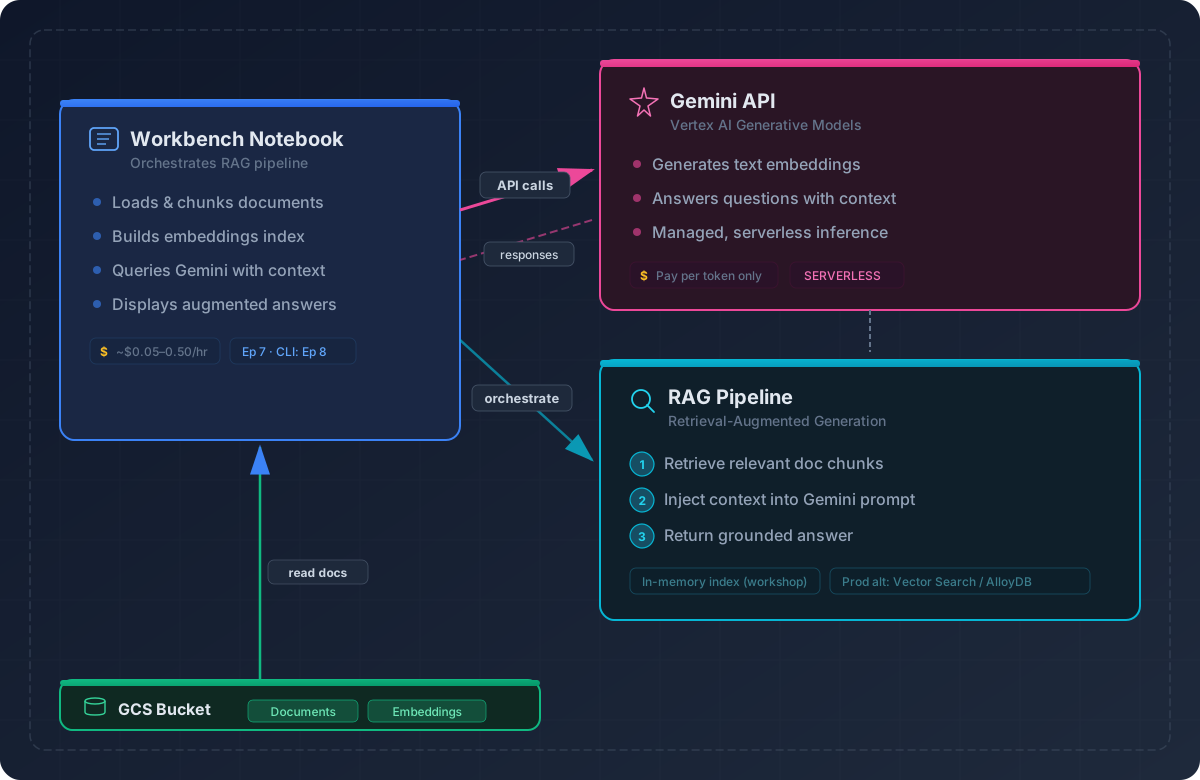
Overview: What we’re building
Retrieval-Augmented Generation (RAG) is a pattern:
- You ask a question.
- The system retrieves relevant passages from your PDFs or data.
- An LLM answers using those passages only, with citations.
This approach is useful any time you need to ground an LLM’s answers in a specific corpus — research papers, policy documents, lab notebooks, etc. For example, a sustainability research team could use this pipeline to extract AI water and energy metrics from published papers, getting cited answers instead of generic LLM summaries.
About the corpus
Our corpus is a curated bundle of 32 research papers
on the environmental and economic costs of AI — topics like training
energy, inference power consumption, water footprint, and carbon
emissions. The papers span 2019–2025 and include titles such as
“Green AI”, “Making AI Less Thirsty”, and “The
ML.ENERGY Benchmark”. They’re shipped as
data/pdfs_bundle.zip in the lesson repository so that
everyone works with the same documents. You could swap in your own PDFs
— the pipeline is corpus-agnostic.
Step 1: Set up the environment
Navigate to
/Intro_GCP_for_ML/notebooks/07-Retrieval-augmented-generation.ipynb
to begin this notebook. Select the Python 3 (ipykernel)
kernel — this episode uses only the google-genai
client library and scikit-learn, so no PyTorch or TensorFlow kernel is
needed.
CD to instance home directory
To ensure we’re all in the same starting spot, change directory to your Jupyter home directory.
We need the pypdf library to extract text from PDF
files.
Cost note: Installing packages is free; you’re only billed for VM runtime.
Step 2: Extract and chunk PDFs
Before we can search our documents, we need to break them into smaller pieces (“chunks”). Embedding models produce better vectors from focused passages than from entire papers, and LLMs have limited context windows. The code below extracts text from each PDF and splits it into overlapping chunks of roughly 1,200 characters.
PYTHON
import zipfile, pathlib, re, pandas as pd
from pypdf import PdfReader

ZIP_PATH = pathlib.Path("Intro_GCP_for_ML/data/pdfs_bundle.zip")
DOC_DIR  = pathlib.Path("/home/jupyter/docs")
DOC_DIR.mkdir(exist_ok=True)

# unzip
with zipfile.ZipFile(ZIP_PATH, "r") as zf:
    zf.extractall(DOC_DIR)

def chunk_text(text, max_chars=1200, overlap=150):
    for i in range(0, len(text), max_chars - overlap):
        yield text[i:i+max_chars]

rows = []
for pdf in DOC_DIR.glob("*.pdf"):
    txt = ""
    for page in PdfReader(str(pdf)).pages:
        txt += page.extract_text() or ""
    for i, chunk in enumerate(chunk_text(re.sub(r"\s+", " ", txt))):
        rows.append({"doc": pdf.name, "chunk_id": i, "text": chunk})

corpus_df = pd.DataFrame(rows)
print(len(corpus_df), "chunks created")
Cost note: Only VM runtime applies. Chunk size affects future embedding cost — fewer, larger chunks mean fewer API calls but potentially noisier embeddings.
Why these chunking parameters?
The max_chars=1200 / overlap=150 values are
practical defaults, not magic numbers:
- 1,200 characters (~200–300 tokens) keeps each chunk within a single focused idea while staying well under the embedding model’s 8,000-token limit.
- 150-character overlap ensures that sentences split across chunk boundaries are still captured in at least one chunk.
- Character-based splitting is simple and predictable. Sentence-level or paragraph-level chunking can produce better results but requires an NLP tokenizer and more code.
Chunk size is a key tuning knob: smaller chunks give more precise retrieval but lose surrounding context; larger chunks preserve context but may dilute the embedding with irrelevant text. There’s no single best answer — experiment with your own corpus.
Step 3: Embed the corpus with Vertex AI
Now we convert each text chunk into a numerical vector (an
“embedding”) so we can search by meaning rather than keywords. We use
Google’s gemini-embedding-001 model —
currently the top-ranked Google embedding model on the MTEB
leaderboard. It accepts up to 2,048 input tokens
per text (~1,500 words), supports 100+ languages, and
uses Matryoshka
Representation Learning so you can choose your output dimensions
(768, 1,536, or 3,072) without retraining — smaller dimensions save
memory and speed up search, while larger ones preserve more semantic
detail. See the Choosing an
embedding model callout later in this episode for alternatives.
Initialize the Gen AI client
PYTHON
from google import genai
from google.genai.types import HttpOptions, EmbedContentConfig, GenerateContentConfig
import numpy as np

client = genai.Client(
    http_options=HttpOptions(api_version="v1"),
    vertexai=True,          # route calls through your GCP project for billing
    project=PROJECT_ID,
    location=REGION,
)

# Embedding model and dimensions
EMBED_MODEL_ID = "gemini-embedding-001"
EMBED_DIM = 1536   # valid choices: 768, 1536, 3072
Build the embedding helper
The helper below converts text strings into embedding vectors in
batches. Notice the task_type parameter: the Gemini
embedding model optimizes its vectors differently depending on whether
the input is a document being indexed or a
query being searched. Using
RETRIEVAL_DOCUMENT for corpus chunks and
RETRIEVAL_QUERY for user questions produces better
retrieval accuracy than using a single task type for both.
PYTHON
def embed_texts(text_list, batch_size=32, dims=EMBED_DIM, task_type="RETRIEVAL_DOCUMENT"):
    """
    Embed a list of strings using gemini-embedding-001.
    Returns a NumPy array of shape (len(text_list), dims).

    task_type should be "RETRIEVAL_DOCUMENT" for corpus chunks
    and "RETRIEVAL_QUERY" for user questions.
    """
    vectors = []
    for start in range(0, len(text_list), batch_size):
        batch = text_list[start : start + batch_size]
        resp = client.models.embed_content(
            model=EMBED_MODEL_ID,
            contents=batch,
            config=EmbedContentConfig(
                task_type=task_type,
                output_dimensionality=dims,
            ),
        )
        for emb in resp.embeddings:
            vectors.append(emb.values)
    return np.array(vectors, dtype="float32")
Embed all chunks and build the retrieval index
We embed the full corpus, then build a nearest-neighbors index so that future queries are fast. Think of this as two separate stages:
-
Embed & index (now) — We convert every chunk
into a vector and hand the matrix to scikit-learn’s
NearestNeighbors. Calling.fit()here doesn’t train a model — it organizes the vectors into a data structure optimized for similarity search (like building a phone book before anyone looks up a number). -
Query (later, in Step 4) — When a user question
arrives, we embed that question and call
.kneighbors()to find the corpus vectors closest to it by cosine similarity.
We set metric="cosine" so the index knows how
to measure closeness when queries arrive. The n_neighbors=5
default means each query returns the 5 most relevant chunks — enough to
give the LLM good context without overwhelming it with noise. You can
tune this: fewer neighbors (3) gives more focused answers; more (10)
gives broader coverage at the cost of including less-relevant text.
PYTHON
from sklearn.neighbors import NearestNeighbors

# Embed every chunk in the corpus
emb_matrix = embed_texts(corpus_df["text"].tolist(), dims=EMBED_DIM)
print("emb_matrix shape:", emb_matrix.shape)   # (num_chunks, EMBED_DIM)

# Build nearest-neighbors index
nn = NearestNeighbors(metric="cosine", n_neighbors=5)
nn.fit(emb_matrix)
Step 4: Retrieve and generate answers with Gemini
With embeddings indexed, we can now build the two remaining pieces of the RAG pipeline: a retrieve function that finds relevant chunks for a question, and an ask function that sends those chunks to Gemini for a grounded answer.
Retrieve relevant chunks
PYTHON
def retrieve(query, k=5):
    """
    Embed the user query and find the top-k most similar corpus chunks.
    Returns a DataFrame with a 'similarity' column.
    """
    query_vec = embed_texts(
        [query], dims=EMBED_DIM, task_type="RETRIEVAL_QUERY"
    )[0]

    distances, indices = nn.kneighbors([query_vec], n_neighbors=k, return_distance=True)

    result_df = corpus_df.iloc[indices[0]].copy()
    result_df["similarity"] = 1 - distances[0]   # cosine distance → similarity
    return result_df.sort_values("similarity", ascending=False)
Generate a grounded answer
The ask() function ties the full pipeline together:
retrieve → build prompt → call Gemini. The temperature=0.2
setting keeps answers factual and deterministic. The prompt instructs
Gemini to answer only from the provided context and cite the
source chunks.
PYTHON
GENERATION_MODEL_ID = "gemini-2.5-pro"   # or "gemini-2.5-flash" for cheaper/faster

def ask(query, top_k=5, temperature=0.2):
    """
    Full RAG pipeline: retrieve context, build prompt, generate answer.
    """
    hits = retrieve(query, k=top_k)

    # Build context block with source tags for citation
    context_lines = [
        f"[{row.doc}#chunk-{row.chunk_id}] {row.text}"
        for _, row in hits.iterrows()
    ]
    context_block = "\n\n".join(context_lines)

    prompt = (
        "You are a research assistant. "
        "Use only the following context to answer the question. "
        "Cite your sources using the [doc#chunk] tags.\n\n"
        f"{context_block}\n\n"
        f"Q: {query}\n"
        "A:"
    )

    response = client.models.generate_content(
        model=GENERATION_MODEL_ID,
        contents=prompt,
        config=GenerateContentConfig(temperature=temperature),
    )
    return response.text
Test the pipeline end-to-end
Challenge 1: Explore chunk size tradeoffs
Change the max_chars parameter in
chunk_text() to 500 and then to
2500. Re-run the chunking, embedding, and retrieval
steps each time, then ask the same question.
- How does the number of chunks change?
- Does the answer quality improve or degrade?
- Which chunk size gives the best balance of precision and context?
Smaller chunks (500 chars) produce more precise retrieval hits but each chunk has less context, so Gemini may struggle to synthesize a complete answer. Larger chunks (2,500 chars) preserve more context but may dilute the embedding with unrelated text, leading to less accurate retrieval. For most research-paper corpora, 800–1,500 characters is a practical sweet spot.
Challenge 2: Test hallucination behavior
Ask a question that has no answer in the corpus — for example:
- Does Gemini refuse to answer, or does it hallucinate?
- Try modifying the system prompt in
ask()to add: “If the context does not contain enough information to answer, say ‘I don’t have enough information to answer this.’” - Does the modified prompt change the behavior?
Without the guardrail prompt, Gemini may produce a plausible-sounding answer from its training data, ignoring the “use only the following context” instruction. Adding an explicit refusal instruction significantly reduces hallucination. This is a key lesson: prompt engineering is part of RAG system design, not just model selection.
Challenge 3: Compare
gemini-2.5-pro vs gemini-2.5-flash
Change GENERATION_MODEL_ID to
"gemini-2.5-flash" and ask the same question.
PYTHON
# Change the generation model and re-run a query
GENERATION_MODEL_ID = "gemini-2.5-flash"
print(ask("How much energy does it cost to train a large language model?"))- Is the answer quality noticeably different?
- How does response time compare?
- Check the Vertex AI pricing page — what’s the cost difference per million tokens?
For well-grounded RAG queries (where the answer is clearly in the context), Flash often produces comparable answers at significantly lower cost and latency. Pro shines when the question requires more nuanced reasoning across multiple chunks. For workshop-scale workloads, Flash is usually sufficient and much cheaper.
Challenge 4: Tune retrieval depth with
top_k
Call ask() with top_k=2 and then with
top_k=10. Compare the answers.
PYTHON
# Try different retrieval depths
print("--- top_k=2 ---")
print(ask("How much energy does it cost to train a large language model?", top_k=2))

print("\n--- top_k=10 ---")
print(ask("How much energy does it cost to train a large language model?", top_k=10))- With
top_k=2, does Gemini miss relevant information? - With
top_k=10, does the extra context help or introduce noise? - What value of
top_kseems to work best for your question?
Lower top_k gives Gemini a tighter, more focused context
— good when the answer is localized in one or two chunks. Higher
top_k provides broader coverage but risks including
irrelevant passages that can confuse the model or dilute the answer. A
good default is 3–5 for most research-paper RAG tasks. For questions
that span multiple sections of a paper, higher values help.
Challenge 5: Try different questions
The quality of a RAG system depends heavily on the questions you ask. Try these queries — each tests a different aspect of retrieval and generation:
PYTHON
# Off-topic question — not covered by the corpus at all
print(ask("How much does an elephant weight?"))

print("\n" + "="*60 + "\n")

# Comparative question — requires synthesizing across sources
print(ask("Is cloud computing more energy efficient than university HPC clusters?"))

print("\n" + "="*60 + "\n")

# Opinion/marketing question — may tempt the model to go beyond the corpus
print(ask("Is Google Cloud the best cloud provider option?"))
For each question, consider: - Does the answer cite specific numbers or papers from the corpus? - Does Gemini stay grounded in the retrieved context, or does it add outside knowledge? - Which question produces the most useful, well-supported answer?
The elephant-weight question is deliberately off-topic — the corpus is about environmental costs of AI, not zoology, so a well-behaved RAG system should indicate that the context doesn’t contain relevant information rather than answering from general knowledge. The cloud-vs-HPC question requires the model to compare across sources — look for whether it hedges appropriately when papers disagree. The “best cloud provider” question is deliberately tricky: the corpus is about environmental costs of AI, not cloud provider rankings, so a well-behaved RAG system should indicate that the context doesn’t support a definitive answer rather than generating marketing-style claims.
Step 5: Cost summary
Understanding the cost of each pipeline component helps you decide
where to optimize. For a small workshop with a handful of PDFs, total
costs are typically well under $1.
| Step | Resource | Cost Driver | Typical Range |
|---|---|---|---|
| VM runtime | Vertex AI Workbench (n1-standard-4) |
Uptime (hourly) | ~ $0.20/hr |
| Embeddings | gemini-embedding-001 |
Tokens embedded (one-time) | ~ $0.10 / 1M tokens |
| Retrieval | Local NearestNeighbors
|
CPU only | Free |
| Generation | gemini-2.5-pro |
Input + output tokens per query | ~ $1.25–$10 / 1M tokens |
| Generation (alt) | gemini-2.5-flash |
Input + output tokens per query | ~ $0.15–$0.60 / 1M tokens |
Tip: Embeddings are the best investment — compute them once, reuse them for every query. Generation is the ongoing cost; choosing Flash over Pro and keeping prompts concise are the two biggest levers.
Common issues and troubleshooting
-
Rate limiting on the Gemini API: If you see
429 Resource Exhaustederrors, wait 30–60 seconds and retry. For large corpora, add a shorttime.sleep(1)between embedding batches. -
PDFs with no extractable text: Scanned documents or
image-heavy PDFs will return empty strings from
PdfReader. Check for empty chunks withcorpus_df[corpus_df["text"].str.strip() == ""]and drop them before embedding. -
Embeddings fail mid-batch: If an embedding call
fails partway through, you’ll have partial results. Consider saving
emb_matrixto disk after each batch so you can resume rather than re-embedding everything. -
“Project not found” or permission errors: Make sure
your
PROJECT_IDmatches the project where Vertex AI APIs are enabled. Rungcloud config get-value projectin a terminal cell to verify.
Choosing an embedding model
We use gemini-embedding-001 in this episode, but Vertex
AI offers several alternatives in the Model
Garden:
-
text-embedding-005— older model, 768-dimensional output, still widely used. -
multimodal-embedding-001— supports image + text embeddings for richer use cases. -
Third-party models (via Model Garden) — e.g.,
bge-large-en,cohere-embed-v3,all-MiniLM.
When choosing, consider: output dimensions (higher = more expressive but more memory), token limits, multilingual support, and pricing.
Cleanup note
The embeddings and nearest-neighbors index in this episode are held in memory — they disappear when your notebook kernel restarts or your VM stops. No persistent cloud resources (endpoints, buckets, or managed indexes) were created, so there’s nothing extra to clean up beyond the VM itself. If you’re done for the day, stop your Workbench Instance to avoid ongoing charges (see Episode 9).
Key takeaways
- Chunk → embed → retrieve → generate is the core RAG loop. Each step has its own tuning knobs.
- Use Vertex AI managed embeddings and Gemini for a low-ops, cost-controlled pipeline.
- Cache embeddings — computing them once and reusing them saves the most cost.
- Prompt engineering matters — how you instruct the LLM to use (or refuse to use) the context directly affects answer quality and hallucination risk.
- This workflow generalizes to any retrieval task — research papers, policy documents, lab notebooks, etc.
Scaling beyond in-memory search
This episode stores embeddings in memory with
scikit-learn’s NearestNeighbors — fine for prototyping with
up to a few thousand chunks. For larger or production corpora, swap in a
managed vector store such as Vertex
AI Vector Search. The core pipeline (chunk → embed → retrieve →
generate) stays the same; only the index backend changes.
Hugging Face / open-model alternatives
You can replace the Google-managed APIs used in this episode with open-source models:
-
Embeddings:
sentence-transformers/all-MiniLM-L6-v2,BAAI/bge-large-en-v1.5 -
Generators:
google/gemma-2b-it,mistralai/Mistral-7B-Instruct, ortiiuae/falcon-7b-instruct
This requires a GPU VM (e.g., n1-standard-8 +
T4) and manual model management. Rather than running a
large GPU in Workbench, you can launch Vertex AI custom jobs that
perform the embedding and generation steps — start with a PyTorch
container image and add the HuggingFace libraries as requirements.
What’s next?
This episode built a minimal RAG pipeline from scratch. Here’s where to go from here depending on your goals:
-
Vertex
AI Vector Search — Replace the in-memory
NearestNeighborsindex with a managed, scalable vector database for production workloads with millions of documents. - Vertex AI Agent Builder — Build managed RAG applications with built-in grounding, chunking, and retrieval — less code, more guardrails.
- Evaluation and iteration — Measure retrieval quality (precision@k, recall@k) and generation quality (faithfulness, relevance) to systematically improve your pipeline.
-
Advanced chunking — Explore sentence-level
splitting (with
spaCyornltk), recursive chunking, or document-structure-aware chunking for better retrieval on complex papers. - Deploying RAG in Bedrock vs. Local: WattBot 2025 Case Study — See how the same sustainability-paper corpus powers a production RAG system deployed on AWS Bedrock and local hardware, with comparisons of cost, latency, and model choice.
- RAG grounds LLM answers in your own data — retrieve first, then generate.
- Vertex AI provides managed embedding and generation APIs that require minimal infrastructure.
- Chunk size, retrieval depth (
top_k), and prompt design are the primary tuning levers. - Always cite retrieved chunks for reproducibility and transparency.
- Embeddings are computed once and reused; generation cost scales with query volume.